Swagger 53.0.5
Publisher Description


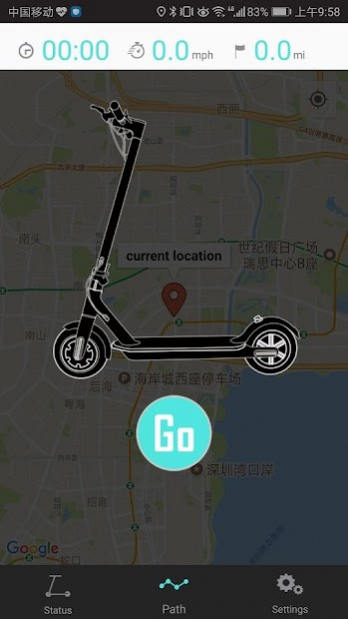
It’s time to ramp up your scooter’s swag! Pair the app with your Swagger 5 scooter and unlock features you’re sure to love. There’s no better way to do it than pairing your cycle with the app!
From scooter newbies to all-time enthusiasts, the app will allow you to tailor your riding experience anytime you like! Keep an eye on your current speed and battery power with just a glance inside the app. And, after you’ve been blazing trails a while and stopped to take a break, you can check out your average speed!
Customize things your way by toggling or turning on a number of features like Cruise Control and automatic acceleration. Cruise through town, switch up your speed, and so much more. Keep an eye on status, map out your paths, and even track your time to record how long you’ve been out and about!
Features:
- Connect securely via Bluetooth technology
- Monitor current speed, average speed, and battery life
- Track distance and time traveled
- Switch gears for speed that matches your preference
- Toggle on automatic powered acceleration
- Turn Cruise Control on or off as needed
- Diagnose any battery or system errors on the go
Where will you adventure next?
About Swagger 5
The company that develops Swagger 5 is Pro-com Products. The latest version released by its developer is 3.0.5. This app was rated by 2 users of our site and has an average rating of 4.0.
To install Swagger 5 on your Android device, just click the green Continue To App button above to start the installation process. The app is listed on our website since 2020-03-26 and was downloaded 98 times. We have already checked if the download link is safe, however for your own protection we recommend that you scan the downloaded app with your antivirus. Your antivirus may detect the Swagger 5 as malware as malware if the download link to com.anji.swagger5 is broken.
How to install Swagger 5 on your Android device:
- Click on the Continue To App button on our website. This will redirect you to Google Play.
- Once the Swagger 5 is shown in the Google Play listing of your Android device, you can start its download and installation. Tap on the Install button located below the search bar and to the right of the app icon.
- A pop-up window with the permissions required by Swagger 5 will be shown. Click on Accept to continue the process.
- Swagger 5 will be downloaded onto your device, displaying a progress. Once the download completes, the installation will start and you'll get a notification after the installation is finished.
